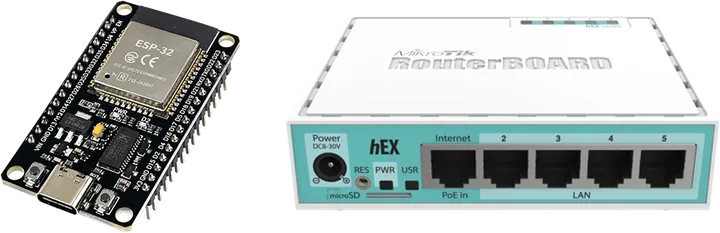
ESP32 · MikroTikv1.0.3
MikroTik + ESP32
ESP32 runs the coin slot and admin. The MikroTik runs the hotspot.
What you need
- ESP32 DevKit (ESP32-WROOM-32, 4MB)
- MikroTik hEX (RouterOS 6.49)
- Coin acceptor (12V), relay, 12V→5V buck
- WiFi AP in AP mode
Files
1
Latest ESP32 firmware
Flash the full file on a new board. Use the OTA file for updates.
Firmware, first install (full .bin) v1.0.3
Firmware update (OTA .bin) v1.0.3
New: MikroTik VLAN option. Settings › MikroTik API › VLAN makes a vlan-setup.rsc that puts the hotspot on a VLAN and can add a private network for your own SSID (customers cannot reach it). After the hotspot moves, the vendo finds the new hotspot port by itself.
2
Latest MikroTik files
Login page and setup script for the hotspot.
MikroTik files (login page + setup scripts) v1.0.3
Upload the hotspot folder to Files › hotspot. Scripts: vendo-setup.rsc, fair-share.rsc, gaming-boost.rsc, and NEW vlan-setup.rsc (optional VLAN for the hotspot + private network; easier from the vendo admin › Settings › MikroTik API › VLAN).
Flash it from your browserPlug the board in by USB, press Install. Chrome or Edge on a computer.
Open Web Flasher
How to install
- Plug the ESP32 in by USB and open the Web Flasher (Chrome or Edge on a computer). Press Install. Or flash the full .bin at address 0x0 with esptool-js.
- Upload the contents of the hotspot folder to MikroTik Files › hotspot (Winbox or WebFig).
- Import the setup in the MikroTik terminal: /import file-name=vendo-setup.rsc
- Open the vendo admin at http://VENDO-IP/admin and set the MikroTik login in Settings.
- Updates later: vendo admin › System › Firmware update › choose the OTA .bin. Settings and license are kept.
Downloads are free. The firmware runs in DEMO (up to ₱20 in sales per day, no voucher generator) until it gets a license. Buy a license to remove the limit.